Deploying JMap Pro Extensions
To be deployed within JMap Pro applications, client extensions must follow certain rules. If these rules are met, the extension appears in the deployment section of JMap Admin.
1 - Group extension classes in an archive (JAR)
All classes and resources (images, etc.) of the extension must be contained in a single JAR archive file. Use a meaningful and unique name, as this name will be used in the following steps.
2 - Include a manifest file
The extension archive must include a manifest.mf file with the following entries:
Variable |
Description |
extension_class |
Identifies the main class of the extension, derived from the abstract class JMapClientExtension. |
extension_name |
Specifies the name of the extension. This name appears in JMapAdmin when deploying applications. |
extension_version |
Specifies the version number of the extension. This information appears in JMapAdmin when deploying applications. The version number is used only to simplify the management of extensions. |
Here is an example of a manifest file's content:
extension_class: jmap.extensions.edition.EditionExtension extension_name: Edition extension_version: 1.0.0049 |
3 - Provide a JNLP file
The JNLP file is required. It describes the deployed library. The file must have the same name as the extension's JAR file (except for the .jnlp extension). The following example shows the parts that must be changed in bold.
<?xml version="1.0" encoding="utf-8"?> <!-- JNLP File for Extension libraries --> <jnlp spec="1.0+" codebase="http://$JMAPSERVER_HOST$:$JMAPSERVER_WEBPORT$$PATH$/edition_client" href="edition_client.jnlp"> <information> <title>Edition Extension</title> <vendor>K2 Geospatial</vendor> <description>Edition Extension</description> <description kind="short">Edition Extension</description> </information> <security> <all-permissions/> </security> <resources> <jar href="edition_client.jar"/> </resources> <component-desc/> </jnlp>
|
4 - Place the files in the correct directory
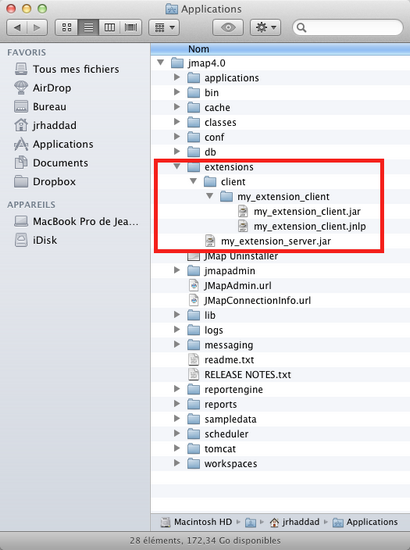
All files that make up the extension (JAR, JNLP, and other files) must be placed in a directory created specifically for the extension and located within the directory for Client Extensions (JMap_HOME / extensions / client). The name of the extension's directory must be identical to the name of the extension's JAR. The following image shows how files and directories are organized in Windows for K2 Geospatial's Edition extension.